I wrote this Cloudflare zone security checklist after "I'm sure I turned that on" led me to a WAF custom rule blocking curl/* on a zone I never set up that way. Twelve checks, each with a terminal command, so the answer is a number instead of a memory.
By hand it takes about ten minutes per zone. Fine for one zone. The last section is about what happens with more.
Set these once for the shell snippets. The token is read-only (Zone Read, Zone Settings Read, DNS Read, Firewall Read).
export CF_TOKEN=...
export ZONE_ID=...
export ACCOUNT_ID=...
cf() { curl -s -H "Authorization: Bearer $CF_TOKEN" "https://api.cloudflare.com/client/v4$1"; }
TLS: minimum version, Always Use HTTPS, HSTS
1. Minimum TLS 1.2. Anything lower is a compliance finding waiting to happen.
cf /zones/$ZONE_ID/settings/min_tls_version | jq .result.value # "1.2"2. Always Use HTTPS. Plain-HTTP requests should 301, not serve content.
curl -sI http://example.com | grep -i location3. HSTS with max-age of 6 months or more. No header means it's off. The toggle is under SSL/TLS, Edge Certificates.
curl -sI https://example.com | grep -i strict-transport-security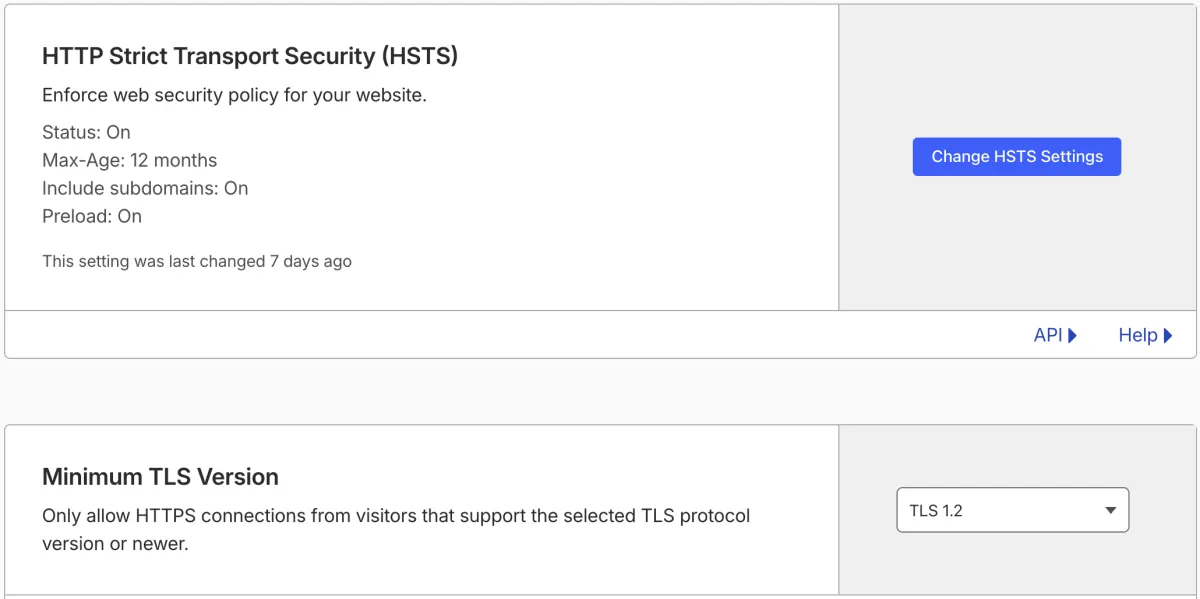
That's how checks 1 and 3 look in the dashboard on my zone. The curl output is the one to trust, since it's what browsers get.
WAF, bots, rate limiting
4. WAF managed rules deployed. The Free plan gets the Cloudflare Free Managed Ruleset, and Pro and up get the full set. Either way it should be deployed, not just available. 0 means nothing is.
cf /zones/$ZONE_ID/rulesets/phases/http_request_firewall_managed/entrypoint | jq '.result.rules | length'5. Bot Fight Mode on. Security, Bots, one toggle. Turn it off only if you know which integration it breaks, and write that down.
6. Rate limiting on auth and form endpoints. The Free plan includes one rule. Put it on /login, /api/auth or the contact form.
cf /zones/$ZONE_ID/rulesets/phases/http_ratelimit/entrypoint | jq '.result.rules[].description'DNS: DNSSEC, mail records, orphans
7. DNSSEC enabled. Empty output means the DS record isn't at the registrar, even if Cloudflare shows "pending".
dig +short DS example.com8. SPF, DKIM, DMARC, even if the zone sends no mail. Especially then. A domain with no mail policy can be spoofed by anyone. Baseline for a non-sending zone is v=spf1 -all and v=DMARC1; p=reject.
dig +short TXT example.com | grep spf
dig +short TXT _dmarc.example.com
9. No orphaned records. Records pointing at IPs or hosts you no longer control are a subdomain-takeover risk. The check is boring. List everything and ask "what's this?"
cf "/zones/$ZONE_ID/dns_records?per_page=500" | jq -r '.result[] | "\(.type) \(.name) -> \(.content)"'Access, API tokens, audit log
10. Admin paths behind Access. Think /admin, /wp-admin, internal dashboards. An Access application with an email allow-list is free for up to 50 users.
cf /accounts/$ACCOUNT_ID/access/apps | jq '.result[].domain'11. Scoped API tokens, not the Global API Key. Automation runs on minimum permissions and an expiry. Tokens with "expires_on": null are the ones to look at.
cf /user/tokens | jq '.result[] | {name, status, expires_on}'12. Audit log reviewed. Cloudflare keeps one per account and nobody reads it. Once a month, count the changes. If the number surprises you, that's the finding.
# macOS date syntax; on Linux use: date -u -d '30 days ago' +%Y-%m-%dT00:00:00Z
cf "/accounts/$ACCOUNT_ID/audit_logs?since=$(date -u -v-30d +%Y-%m-%dT00:00:00Z)" | jq '.result | length'
Why check Cloudflare zone settings you already set?
Because settings drift and nobody sees it. The curl/* rule above was on my zone before I started this project. It returned 403 to every probe, while browsers got through fine, and so did Workers and webhooks. Every check here is a read-only API call, so a cron can snapshot each zone daily, diff it, and email you only when something changed.
Twelve checks, ten minutes, every zone, every month. For one zone that's a coffee. For forty it's a day, and it's the kind of day that gets skipped. The bill-side version of the same drift problem is in Why Cloudflare bills spike.