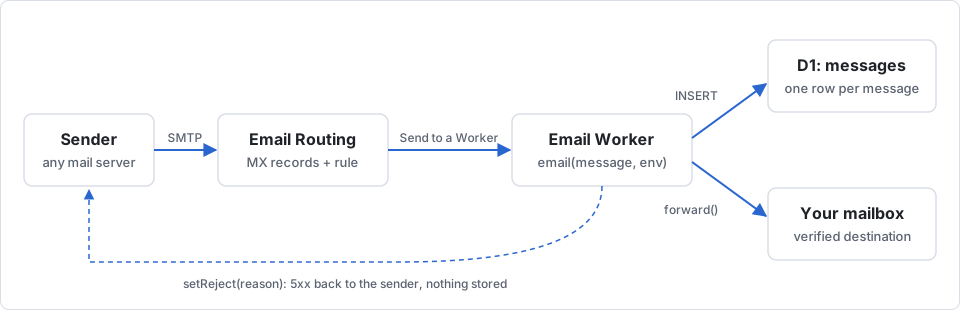
Email Routing forwards a message and keeps nothing. If you want a copy you can search later, point the routing rule at a Worker, write the message to D1, and forward it on. That's a Cloudflare Email Worker inbox, about 30 lines of TypeScript.
Three self-hosted projects already ship that shape, two open source and one source-available. Below are the handler, the schema, the wrangler side, and those three projects in case you'd rather clone than write.
One caveat up front: I haven't run this handler in production. My own support@ still forwards straight to a mailbox. The code follows the Email Workers docs and the three projects below, which do run it.
The 3 self-hosted inboxes built on Email Routing
All three take the same route. An Email Worker receives the message, parses it, and writes it to D1 (and R2 for attachments). A small web UI reads it back. I checked licenses and stacks against each repo on 2026-09-16.
| Project | License | Stack | Up-front cost |
|---|---|---|---|
| cloudflare/agentic-inbox | Apache-2.0 | Workers + D1; built as an inbox that AI agents can read and act on | Free plan is enough to receive; one wrangler deploy |
| HQBase/hqbase | AGPL-3.0 | Workers + D1 + R2 + Queues; sends through the Cloudflare send_email binding; AI-native team email workspace | Same deploy; R2 and Queues bindings to create |
| mirza-rizvi/ResolveHQ | Source-available (not open source) | Email Routing + Resend + D1 + R2 + Queues; shared inbox, threading, AI assist | Its README says it runs on Workers Free for small teams; R2 is activated separately, plus Resend DNS records for outbound |
Self-hosting any of them means you own the D1 migrations, the R2 bucket, the reply path, and the pager when it breaks. If that's fine and one of them fits, clone it and skip the rest of this note.
Why does Cloudflare Email Routing have no built-in mailbox?
Cloudflare's product is the edge, not storage. Email Routing sits at the MX layer. It accepts the SMTP session, applies your rules, and hands the bytes to a destination. Storing mail would mean retention, search, quotas, abuse handling. The way out is that a destination can be a Worker, and all three projects above take it.
The email() handler
An Email Worker exports an email() method alongside, or instead of, fetch():
import PostalMime from "postal-mime";

export default {
  async email(message: ForwardableEmailMessage, env: Env, ctx: ExecutionContext) {
    const raw = await new Response(message.raw).arrayBuffer();   // full MIME, up to 25 MiB
    const parsed = await PostalMime.parse(raw);

    await env.DB.prepare(
      "INSERT INTO messages (id, from_addr, to_addr, subject, text_body, received_at) VALUES (?,?,?,?,?,?)"
    )
      .bind(
        crypto.randomUUID(),
        message.from,
        message.to,
        parsed.subject ?? "",
        parsed.text ?? "",
        new Date().toISOString()
      )
      .run();

    ctx.waitUntil(message.forward("you@personal.example"));     // must be a verified destination
  },
};
Three things worth knowing before the first deploy.
message.raw is a ReadableStream, not a string. Wrap it in a Response to read it once. A second read comes back empty.
forward() only accepts verified destinations, the same list as the dashboard. An unverified address throws, and the sender gets a bounce. One rule maps to one destination or one Worker, so fan-out to several people means calling forward() once per address.
There's also setReject(reason). If the Worker decides a message is spam, message.setReject("...") ends the SMTP session with a 5xx. Nothing gets stored or forwarded.
The wrangler config and the routing rule
{
  "name": "inbox",
  "main": "src/index.ts",
  "compatibility_date": "2026-09-01",
  "d1_databases": [{ "binding": "DB", "database_name": "inbox", "database_id": "..." }]
}
Then in the dashboard: Compute, Email Service, Email Routing, your domain, Routing rules, Create routing rule, your address, action Send to a Worker, pick inbox. There's no wrangler command for the rule itself. It's a dashboard click or the REST API.
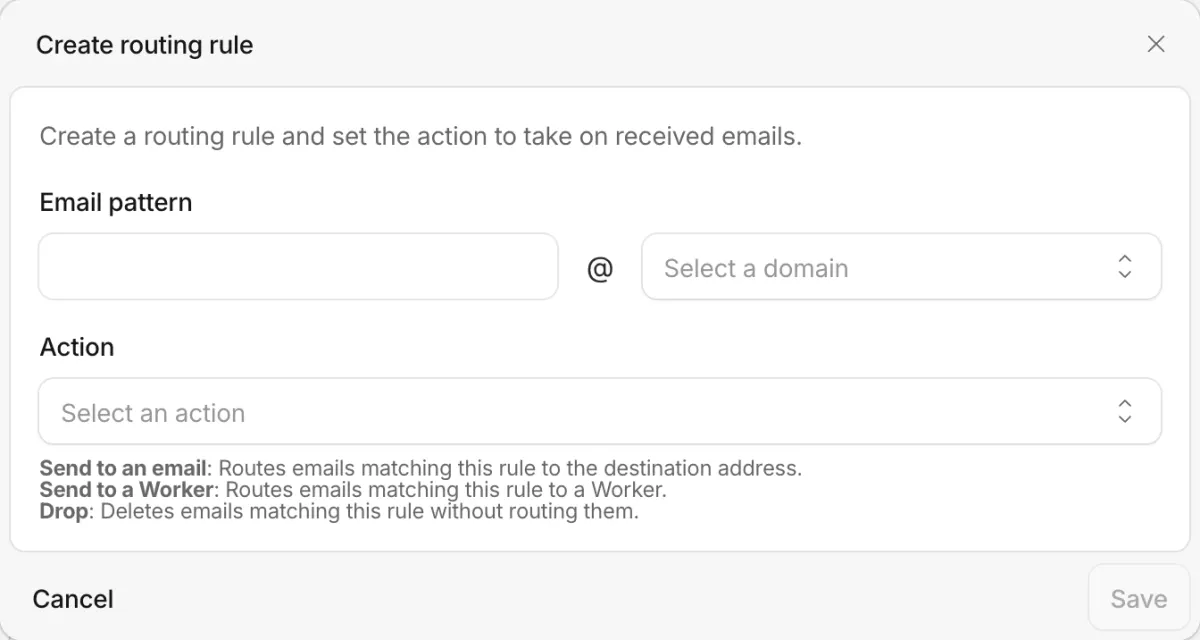
Renaming the Worker drops the binding. Rename first, then re-point the rule.
The D1 schema
CREATE TABLE messages (
  id TEXT PRIMARY KEY,
  from_addr TEXT NOT NULL,
  to_addr TEXT NOT NULL,
  subject TEXT NOT NULL DEFAULT '',
  text_body TEXT NOT NULL DEFAULT '',
  received_at TEXT NOT NULL
);
CREATE INDEX messages_received ON messages (received_at DESC);
D1's free tier is 5 million rows read and 100,000 rows written a day. A support address getting 100 messages a day uses 0.1% of the write budget.
The index on received_at is what stops "latest 50" from scanning the whole table. Every D1 case in Why Cloudflare bills spike is a missing index.
Push attachments to R2 instead of D1. For text-only support mail, D1 alone is where I'd start.
What you have, and what you don't
You end up with a Worker that works as a mailbox. Every message is saved, searchable with SQL, and still forwarded to your phone.
You don't get a UI, threading, "who's handling this", or a way for a person to reply from support@ an hour later. That's what the three projects at the top add. The setup steps before any of this are in Cloudflare Email Routing support address.